display-mixin
MAX7219 Digit Display

More information
- documentation: https://next.esphome.io/components/display/max7219digit.html
Configuration parameters
- name: (required) The name of the display.
- lambda: (required) The lambda to use for rendering the content on the display.
- num_chips: The number of chips you wish to use for daisy chaining. Defaults to 4.
- intensity: The intensity with which the MAX7219 should drive the outputs. Range is from 0, least intense to 15 the brightest. Defaults to 15.
Character-Based LCD Display (PCF8574)

This integration is only for LCD displays that display individual characters on a screen (usually 16-20 columns and 2-4 rows), and not for LCD displays that can control each pixel individually.
More information
Configuration parameters
- name: (required) The name of the display.
- display_size: (required, string) The dimensions of the display with COLUMNSxROWS. If you’re not sure, power the display up and just count them.
- address: (required) The I²C address of the PCF8574 chip, defaults to 0x3F.
- lambda: (required) The lambda to use for rendering the content on the display.
- pages: (required) Show pages instead of a single lambda.
Sample configurations
pcf8574_display_basic_esp32
Source configuration:
1 2 3 4 5 6 7 8 9 10 11 12 13 | device:
pcf8574_display_basic_esp32:
board: nodemcu-32s
mixins:
- clock_pin: GPIO22
data_pin: GPIO21
kind: i2c_bus
name: i2c_1
- address: 39
bus: i2c_1
display_size: 20x4
kind: pcf8574_display
name: display_output
|
The rendered configuration:
1 2 3 4 5 6 7 8 9 10 11 12 13 14 15 16 | display:
- address: 39
dimensions: 20x4
id: display_output
platform: lcd_pcf8574
esphome:
board: nodemcu-32s
name: pcf8574_display_basic_esp32
platform: ESP32
i2c:
- id: i2c_1
scan: true
scl: GPIO22
sda: GPIO21
logger:
level: DEBUG
|
SSD1306 OLED Display (I²C)

These displays are small, only about 1” diagonal, but very readable due to the high contrast of an OLED display. This display is made of 128x32 individual white OLED pixels, each one is turned on or off by the controller chip. Because the display makes its own light, no backlight is required. This reduces the power required to run the OLED and is why the display has such high contrast. The driver chip SSD1306, communicates via I²C only.
More information
- documentation: https://esphome.io/components/display/ssd1306.html
Configuration parameters
- name: (required) The name of the display.
- model: (required) The model of the display. Either SSD1306 or SH1106.
- display_size: (required, string) The dimensions of the display in COLUMNSxROWS. Options 128x32, 128x64, 96x16 and 64x48.
- address: (required) The I²C address of the display. Defaults to 0x3C.
- lambda: (required) The lambda to use for rendering the content on the display.
- pages: (required) Show pages instead of a single lambda.
Sample configurations
ssd1306_i2c_display_128x64_esp32
Source configuration:
1 2 3 4 5 6 7 8 9 10 11 12 13 14 15 16 17 18 19 20 21 22 | device:
ssd1306_i2c_display_128x64_esp32:
board: nodemcu-32s
mixins:
- clock_pin: GPIO22
data_pin: GPIO21
kind: i2c_bus
name: i2c_1
- file: ../fonts/OpenSans-Regular.ttf
kind: ttf_font
name: opensans
size: 20
- cycle_interval: 10s
display_size: 128x64
kind: ssd1306_i2c_display
model: SSD1306
name: display_output
pages:
- id: page1
lambda: it.print(0, 0, id(opensans), "Hello World!");
- id: page2
lambda: it.print(0, 0, id(opensans), "Good Bye!");
|
The rendered configuration:
1 2 3 4 5 6 7 8 9 10 11 12 13 14 15 16 17 18 19 20 21 22 23 24 25 26 27 28 29 30 | display:
- address: '0x3C'
id: display_output
model: SSD1306 128x64
pages:
- id: page1
lambda: it.print(0, 0, id(opensans), "Hello World!");
- id: page2
lambda: it.print(0, 0, id(opensans), "Good Bye!");
platform: ssd1306_i2c
esphome:
board: nodemcu-32s
name: ssd1306_i2c_display_128x64_esp32
platform: ESP32
font:
- file: ../fonts/OpenSans-Regular.ttf
id: opensans
size: 20
i2c:
- id: i2c_1
scan: true
scl: GPIO22
sda: GPIO21
interval:
- interval: 10s
then:
- display.page.show_next: display_output
- component.update: display_output
logger:
level: DEBUG
|
ssd1306_i2c_display_128x32_esp32
Source configuration:
1 2 3 4 5 6 7 8 9 10 11 12 13 14 15 16 17 18 19 20 21 22 | device:
ssd1306_i2c_display_128x32_esp32:
board: nodemcu-32s
mixins:
- clock_pin: GPIO22
data_pin: GPIO21
kind: i2c_bus
name: i2c_1
- file: ../fonts/OpenSans-Regular.ttf
kind: ttf_font
name: opensans
size: 20
- cycle_interval: 10s
display_size: 128x32
kind: ssd1306_i2c_display
model: SSD1306
name: display_output
pages:
- id: page1
lambda: it.print(0, 0, id(opensans), "Hello World!");
- id: page2
lambda: it.print(0, 0, id(opensans), "Good Bye!");
|
The rendered configuration:
1 2 3 4 5 6 7 8 9 10 11 12 13 14 15 16 17 18 19 20 21 22 23 24 25 26 27 28 29 30 | display:
- address: '0x3C'
id: display_output
model: SSD1306 128x32
pages:
- id: page1
lambda: it.print(0, 0, id(opensans), "Hello World!");
- id: page2
lambda: it.print(0, 0, id(opensans), "Good Bye!");
platform: ssd1306_i2c
esphome:
board: nodemcu-32s
name: ssd1306_i2c_display_128x32_esp32
platform: ESP32
font:
- file: ../fonts/OpenSans-Regular.ttf
id: opensans
size: 20
i2c:
- id: i2c_1
scan: true
scl: GPIO22
sda: GPIO21
interval:
- interval: 10s
then:
- display.page.show_next: display_output
- component.update: display_output
logger:
level: DEBUG
|
SSD1325 OLED Display

These displays are small, only about 1” diagonal, but very readable due to the high contrast of an OLED display. This display is made of 128x32 individual white OLED pixels, each one is turned on or off by the controller chip. Because the display makes its own light, no backlight is required. This reduces the power required to run the OLED and is why the display has such high contrast. The driver chip SSD1306, communicates via I²C only.
More information
- documentation: https://esphome.io/components/display/ssd1325.html
Configuration parameters
- name: (required) The name of the display.
- display_size: (required, string) The dimensions of the display in COLUMNSxROWS. Options 128x32, 128x64, 96x16 and 64x48.
- lambda: (required) The lambda to use for rendering the content on the display.
- pages: (required) Show pages instead of a single lambda.
Waveshare E-Paper Display
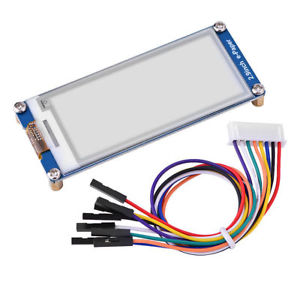
More information
Configuration parameters
- name: (required) The name of the display.
- model: (required, string) The model of the E-Paper display. Options are: 1.54in, 2.13in, 2.70in, 2.90in, 4.20in, 7.50in.
- full_update_every: (required, string) E-Paper displays have two modes of switching to the next image: A partial update that only changes the pixels that have changed and a full update mode that first clears the entire display and then re-draws the image. The former is much quicker and nicer, but every so often a full update needs to happen because artifacts accumulate. On the 1.54in, 2.13in and 2.90in models you have the option to switch only do a full-redraw every x-th time using this option. Defaults to 30 on the described models and a full update for all other models.
- lambda: (required) The lambda to use for rendering the content on the display.
- pages: (required) Show pages instead of a single lambda.